
CASE
[Production] Fully automating bookings: building a LINE system for a nail salon
Overview
Client: A nail salon (Toyama Prefecture)
Period: Late April to end of June 2025 (about 1.5 months, including onboarding support)
Scope: Overall design of the LINE official account, L-Step setup, training and onboarding support
Industry: Beauty salon (nail care close to medical treatment)
The challenge
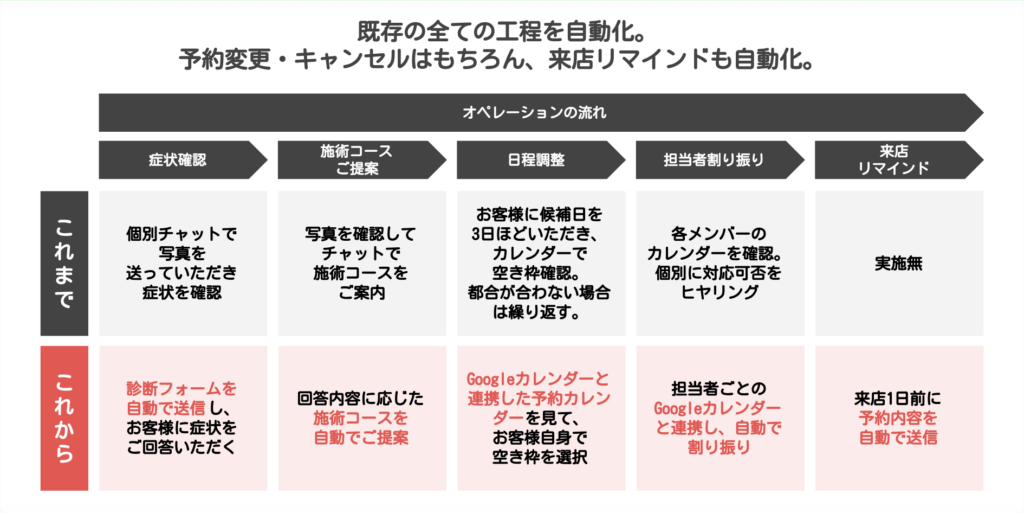
The whole flow from booking to visit depended on staff handling chats manually.
Customers’ symptoms were checked one by one by looking at photos sent in chat.
Recommending a treatment course for each symptom, checking open slots and scheduling, asking each staff member individually to assign the right person... every step was handled in individual chats, and managing bookings took a great deal of time. Visit reminders were not being sent at all.
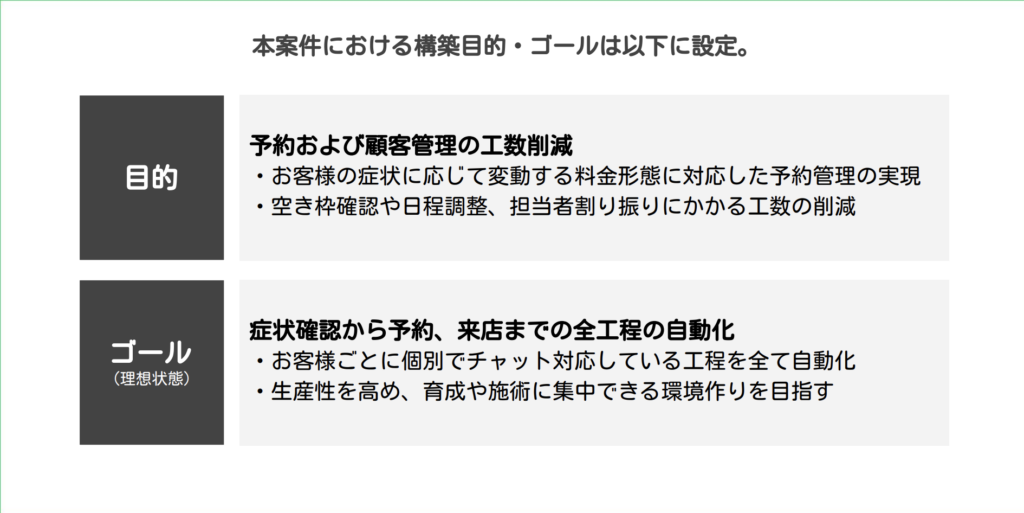
The owner wanted to focus on treatments and training staff, and the back-office workload was at the heart of the problem.
Our proposal and approach
We set the goal as “automate every step from the symptom check to the visit,” and built a LINE official account using L-Step.
For requirements, we carefully interviewed the client about their current workflow, problems and ideal state.
We prioritized a design that collects the necessary information while keeping the client’s workload to a minimum.
There were four main components.
① Automatic symptom-check form
A diagnostic form is sent automatically as soon as a customer adds the account as a friend.
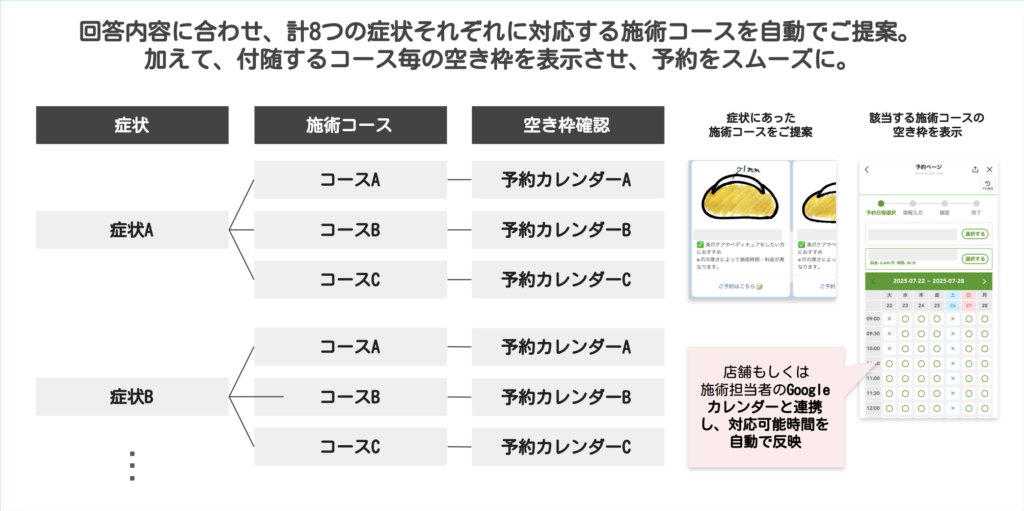
It automatically suggests treatment courses for eight types of symptoms, eliminating manual photo checks and course recommendations one by one.
② Automated booking with Google Calendar
We built a system that shows open slots in real time based on the symptom and course, so customers can choose their own date and time.
The back-and-forth of scheduling dropped to zero.
③ Automatic staff assignment
We connected every staff member’s Google Calendar.
At the same time, we scored each staff member’s skills and the symptoms they can handle. Assignments are made automatically based on OK / NG for each symptom and skill priority.
It also supports giving priority to newer staff.
④ Automated visit reminders
At 8 p.m. the day before the visit, booking details and a confirmation link are sent automatically.
We also set up a path for customers to change or cancel bookings themselves.
The project went as follows:
Kickoff meeting → Interviews → Requirements → Build → Interim delivery (80% complete) → Revisions → Final delivery → Onboarding support
All of this was completed in about 1.5 months. The interim report helped us avoid misunderstandings along the way.
Results
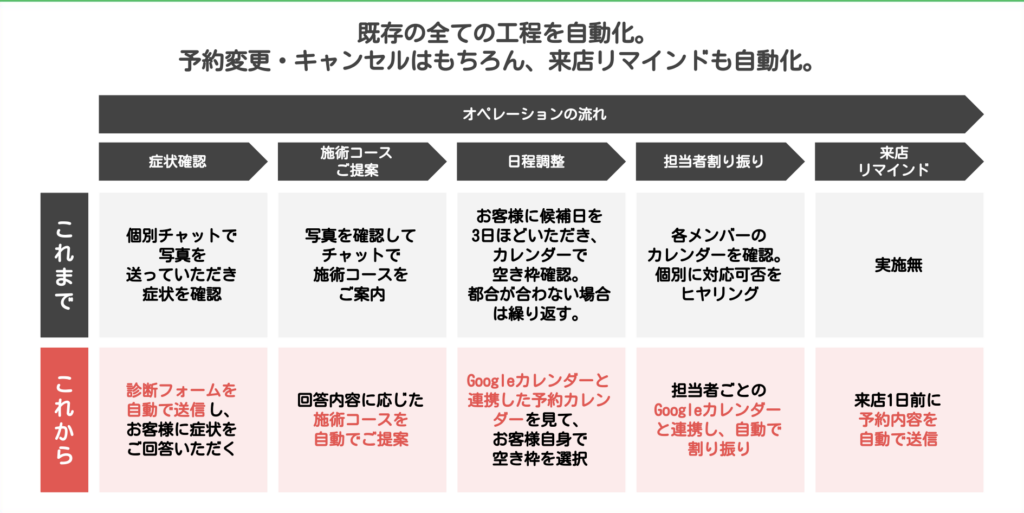
Every booking step — from the symptom check and staff assignment to visit reminders — is now automated.
Manual handling through individual chats dropped to zero, and the owner and staff can now focus on their real work.
Here is how the workflow changed.
- Symptom check to course recommendation: (Before) manual chat → (Now) fully moved to an automatic diagnostic form
- Scheduling: (Before) several rounds of chat → (Now) customers choose open slots themselves
- Staff assignment: (Before) asking staff individually (several rounds) → (Now) automatic assignment via calendar integration
- Visit reminders: (Before) none → (Now) sent automatically at 8 p.m. the day before
Our perspective
The key point of this case is that “designing automation starts with taking stock of the entire operation.”
Without making the existing workflow visible, you cannot decide what to automate and how.
Instead of turning requests like “we want to take bookings on LINE” or “other shops use LINE too” straight into features, digging into “why does this workload exist?” leads to a design that solves the real problem.
L-Step × Google Calendar is a solution that can easily be applied to any business with booking work, such as beauty, restaurants and healthcare. Google Calendar is easy to use and easy to read, and because it is free, staff adopt it quickly. After comparing the features, interfaces and monthly fees of existing booking systems, Google Calendar came out on top — it is far cheaper and easier for the client to use.
This case is a useful reference for any business considering automating its booking flow, whatever the industry.